
Stop Writing Verbose Code: A Practical Guide to java.util.function

Introduction

In our journey learning about functional programming in Java, we have explored the building blocks:

Now we’re going to explore thejava.util.function package – A powerful toolkit that provides 40+ specialized, ready-to-use interfaces for common programming tasks.

Understanding the java.util.function Package

The java.util.function package has many interfaces, more than 40, and understanding them all is very difficult. But there’s a method I always use: divide and conquer.

If you group its interfaces into a few clear categories it will be easy:

Common Functional Interfaces

This group contains the four main interfaces of the package. If you understand the concept behind these four interfaces, you will easily understand the others. Each one has a single job:

  • Function<T, R> — Transforms a value of type T into a value of type R
  • Consumer<T> — Receives a value of type T and does something with it (no return)
  • Supplier<T> — Takes nothing and returns a value of type T
  • Predicate<T> — Receives a value of type T and returns a boolean (true or false)

1. Function<T, R> Interface — (Transforms)

The Function<T, R> interface represents a function that accepts one argument and produces a result. The T is the type of the input and R is the type of the result. Think of it as a transformation machine: you put something in, and you get something different out.

package java.util.function;

import java.util.Objects;

@FunctionalInterface
public interface Function<T, R> {

    R apply(T t);
 
    default <V> Function<V, R> compose(Function<? super V, ? extends T> before) {
        Objects.requireNonNull(before);
        return (V v) -> apply(before.apply(v));
    }
 
    default <V> Function<T, V> andThen(Function<? super R, ? extends V> after) {
        Objects.requireNonNull(after);
        return (T t) -> after.apply(apply(t));
    }
 
    static <T> Function<T, T> identity() {
        return t -> t;
    }
}

This interface has the following methods:

  • R apply(T t) – The abstract method of the interface is responsible for transforming the parameter T into a result R.
  • default <V> Function<V, R> compose(Function<? super V, ? extends T> before) – This default method receives a function and executes it before the apply method.
  • default <V> Function<T, V> andThen(Function<? super R, ? extends V> after) – This default method receives a function and executes it after the apply method.
  • static <T> Function<T, T> identity() – This static method returns a function that always returns its input argument unchanged.

Here is a practical example:

import java.util.function.Function;

/**
 * Practical example of Function<T, R>
 * Demonstrating apply(), andThen() and compose()
 */
public class FunctionExample {
    public static void main(String[] args) {

        // A function that converts a String to its length (String -> Integer)
        Function<String, Integer> getLength = s -> s.length();

        // A function that doubles an integer (Integer -> Integer)
        Function<Integer, Integer> doubleIt = n -> n * 2;

        // apply(): basic transformation
        System.out.println(getLength.apply("Hello"));        // 5

        // andThen(): getLength first, then doubleIt
        Function<String, Integer> getLengthThenDouble = getLength.andThen(doubleIt);
        System.out.println(getLengthThenDouble.apply("Hello")); // 10

        // compose(): doubleIt first, then... wait, types must match
        // Here: tripleIt runs before doubleIt
        Function<Integer, Integer> tripleIt = n -> n * 3;
        Function<Integer, Integer> tripleAndDouble = doubleIt.compose(tripleIt);
        System.out.println(tripleAndDouble.apply(5)); // (5 * 3) * 2 = 30
    }
}

2. Consumer<T> Interface — (Uses)

The Consumer<T> interface represents an operation that accepts a single input and returns no result. Unlike Function, it doesn’t transform — it consumes. Think of it as a printer: you hand it something, it does its job, and nothing comes back.

package java.util.function;
 
import java.util.Objects;
 
@FunctionalInterface
public interface Consumer<T> {
 
    void accept(T t);
 
    default Consumer<T> andThen(Consumer<? super T> after) {
        Objects.requireNonNull(after);
        return (T t) -> { accept(t); after.accept(t); };
    }
}

This interface has the following methods:

  • void accept(T t) – The abstract method. Receives the element T and performs the operation. It returns nothing.
  • default Consumer<T> andThen(Consumer<? super T> after) – Chains two consumers together. The current consumer runs first, then the after consumer runs on the same element. Both consumers receive the same input.

Here is a practical example:

import java.util.function.Consumer;
import java.util.List;

/**
 * Practical example of Consumer<T>
 * Demonstrating accept() and andThen()
 */
public class ConsumerExample {
    public static void main(String[] args) {

        // A Consumer that prints a name
        Consumer<String> printName = name -> System.out.println("Name: " + name);

        // A Consumer that prints the name in uppercase
        Consumer<String> printUpper = name -> System.out.println("Upper: " + name.toUpperCase());

        // accept(): basic usage
        printName.accept("Evandro"); // Name: Evandro

        // andThen(): chain two consumers — both run on the same input
        Consumer<String> printBoth = printName.andThen(printUpper);
        printBoth.accept("Evandro");
        // Name: Evandro
        // Upper: EVANDRO

        // Real-world usage: iterating a list with forEach
        List<String> languages = List.of("Java", "Python", "Go");
        languages.forEach(printName); // forEach accepts a Consumer
    }
}

3. Supplier<T> Interface — (Creates)

The Supplier<T> is the exact opposite of Consumer. It takes nothing and returns something. Think of it as a factory or a vending machine: you press the button, you get a value back, without giving anything.

package java.util.function;

@FunctionalInterface
public interface Supplier<T> {

    T get();
}

This interface has only one method:

  • T get() – The abstract method. Takes no arguments and returns a value of type T. This is the simplest interface in the package.

Here is a practical example:

import java.util.function.Supplier;
import java.time.LocalDate;
import java.util.UUID;

/**
 * Practical example of Supplier<T>
 * Demonstrating get() with different return types
 */
public class SupplierExample {
    public static void main(String[] args) {

        // A Supplier that returns a greeting message
        Supplier<String> greeting = () -> "Hello, Functional World!";

        // A Supplier using a Method Reference — no arguments, returns a value
        Supplier<LocalDate> today = LocalDate::now;

        // A Supplier that generates a unique ID each time it is called
        Supplier<String> idGenerator = () -> UUID.randomUUID().toString();

        System.out.println(greeting.get());           // Hello, Functional World!
        System.out.println("Today is: " + today.get()); // Today is: 2026-07-16
        System.out.println("ID: " + idGenerator.get()); // ID: a4f3c2d1-...
        System.out.println("ID: " + idGenerator.get()); // ID: b9e1a3f2-... (different each time)
    }
}

4. Predicate<T> Interface — (Tests)

The Predicate<T> is the interface for conditions and validations. It receives a value and returns a boolean — true or false. Think of it as a filter or a question: you pass something in, and it answers “yes” or “no.”

package java.util.function;

import java.util.Objects;

@FunctionalInterface
public interface Predicate<T> {

    boolean test(T t);

    default Predicate<T> and(Predicate<? super T> other) {
        Objects.requireNonNull(other);
        return (t) -> test(t) && other.test(t);
    }

    default Predicate<T> negate() {
        return (t) -> !test(t);
    }

    default Predicate<T> or(Predicate<? super T> other) {
        Objects.requireNonNull(other);
        return (t) -> test(t) || other.test(t);
    }

    static <T> Predicate<T> not(Predicate<? super T> target) {
        Objects.requireNonNull(target);
        return (Predicate<T>) target.negate();
    }
}

This interface has the following methods:

  • boolean test(T t) – The abstract method. Tests whether the given argument satisfies the condition and returns true or false.
  • default Predicate<T> and(Predicate<? super T> other) – Combines two predicates with AND logic. Returns true only if both predicates return true.
  • default Predicate<T> negate() – Returns the logical negation of this predicate. If the original returns true, this returns false, and vice versa.
  • default Predicate<T> or(Predicate<? super T> other) – Combines two predicates with OR logic. Returns true if at least one predicate returns true.
  • static <T> Predicate<T> not(Predicate<? super T> target) – A static convenience method that negates the given predicate. Useful for method references like Predicate.not(String::isBlank).

Here is a practical example:

import java.util.function.Predicate;
import java.util.List;

/**
 * Practical example of Predicate<T>
 * Demonstrating test(), and(), negate(), or(), and Predicate.not()
 */
public class PredicateExample {
    public static void main(String[] args) {

        Predicate<Integer> isPositive = n -> n > 0;
        Predicate<Integer> isEven = n -> n % 2 == 0;

        List<Integer> numbers = List.of(-4, -1, 0, 3, 6, 7, 10);

        // test(): basic usage
        System.out.println(isPositive.test(5));   // true
        System.out.println(isPositive.test(-3));  // false

        // and(): both conditions must be true
        System.out.println("Positive AND even:");
        numbers.stream()
               .filter(isPositive.and(isEven))
               .forEach(System.out::println); // 6, 10

        // negate(): inverts the condition
        System.out.println("NOT positive (zero or negative):");
        numbers.stream()
               .filter(isPositive.negate())
               .forEach(System.out::println); // -4, -1, 0

        // or(): at least one condition must be true
        System.out.println("Positive OR even:");
        numbers.stream()
               .filter(isPositive.or(isEven))
               .forEach(System.out::println); // -4, 3, 6, 7, 10

        // Predicate.not(): great with method references
        List<String> names = List.of("Java", "", "  ", "Spring", "");
        System.out.println("Non-blank names:");
        names.stream()
             .filter(Predicate.not(String::isBlank))
             .forEach(System.out::println); // Java, Spring
    }
}

Putting It All Together

Now that you know each interface individually, here’s the best way to remember all four. Each one answers a different question:

InterfaceInputOutputAbstract MethodThink of it as…
Function<T, R>TRapply(T t)Transforms
Consumer<T>Tvoidaccept(T t)Uses
Supplier<T>noneTget()Creates
Predicate<T>Tbooleantest(T t)Tests

Now let’s combine all four in a single, realistic example:

import java.util.function.*;
import java.util.List;

/**
 * Real-world example combining all four core functional interfaces.
 * Scenario: process a product catalog — filter, transform, and display.
 */
public class FunctionalToolkitDemo {

    record Product(String name, double price, boolean inStock) {}

    public static void main(String[] args) {

        List<Product> catalog = List.of(
            new Product("Java Book",   49.99, true),
            new Product("Keyboard",   129.99, false),
            new Product("Mouse",       39.99, true),
            new Product("Monitor",    299.99, true)
        );

        // Supplier: provides the header message (creates something from nothing)
        Supplier<String> header = () -> "=== Available Products Under $100 ===";

        // Predicate: tests if a product is available AND affordable
        Predicate<Product> isAvailable  = p -> p.inStock();
        Predicate<Product> isAffordable = p -> p.price() < 100;

        // Function: transforms a Product into a formatted String
        Function<Product, String> format = p ->
            String.format("%-15s $%.2f", p.name(), p.price());

        // Consumer: prints each formatted string with a bullet point
        Consumer<String> printItem = item -> System.out.println("  → " + item);

        // Putting it all together
        System.out.println(header.get()); // Supplier in action

        catalog.stream()
               .filter(isAvailable.and(isAffordable)) // Predicate in action
               .map(format)                            // Function in action
               .forEach(printItem);                   // Consumer in action
    }
}

// Output:
// === Available Products Under $100 ===
//   → Java Book       $49.99
//   → Mouse           $39.99

What’s Next? The Stream API

Throughout this post, you’ve seen all four core functional interfaces working together. But notice something: in the final example, we used .stream(), .filter(), .map(), and .forEach().

That’s not a coincidence. The Stream API is the place where Function, Consumer, Supplier, and Predicate truly shine:

  • .filter() accepts a Predicate
  • .map() accepts a Function
  • .forEach() accepts a Consumer
  • .generate() accepts a Supplier

In the next post, we’ll explore the Stream API in detail — and you’ll see exactly how these functional interfaces become the engine of powerful, declarative data processing pipelines.

Conclusion

The java.util.function package gives you four essential tools that cover the vast majority of your functional programming needs. Once you internalize the mental model, choosing the right interface becomes instinctive:

  • Need to transform a value? Use Function<T, R>.
  • Need to do something with a value but not return anything? Use Consumer<T>.
  • Need to produce a value without receiving anything? Use Supplier<T>.
  • Need to test a condition? Use Predicate<T>.

Master these four, and the rest of the java.util.function package — BiFunction, UnaryOperator, BinaryOperator, and all the primitive specializations — will make complete sense. They are all just variations of these same four ideas.
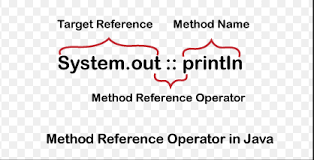
Java Method References: The Ultimate Shortcut for Cleaner Code

Introduction

To understand the evolution of Java 8, think of it this way:

  • The Functional Interface is the Contract. It is the foundation that defines what needs to be done.
  • Lambda Expressions are the implementation. The are anonymous blocks of code where you define the logic.
  • Method References are the shortcut. They provide a specialized, even shorter way to write a Lambda.

Essentially, a Method Reference says: “Don’t write the logic yourself; just use this existing method that already fulfills the contract.”

Okay, but how do I actually write one?

The magic happens with the Double Colon Operator (::). This operator is the syntax used in Java to create a Method Reference. It separates the name of the class or object from the name of the method.

The general form is:

ClassName::methodName

Or

objectReference::methodName

The :: operator is known as the method reference operator, and it is used to point to an existing method instead of writing a lambda expression.

Four Types of Method References

There are four distinct ways to use Method References, depending on what kind of method you are calling:

1. Reference to a Static Method

This type is used when you want to reference a static method from a class.

  • Lambda: () -> Math.random();
  • Method references: Math::random;

In this case, Math is the class, and random is the static method being called.

import java.util.function.Supplier;

/**
 * A simple Method Reference example comparing 
 * Lambda syntax with the Double Colon (::) operator.
 */
public class StaticMethodReferences {
    public static void main(String[] args) {
        // Using a Lambda Expression
        Supplier<Double> lambda = () -> Math.random();
        
        // Using a Method Reference (The Shortcut)
        Supplier<Double> methodReference = Math::random;

        System.out.println("Result from Lambda: " + lambda.get());
        System.out.println("Result from Method Reference: " + methodReference.get());
    }
}

2. Referente to an Instance Methods of a Particular Object

This type is used when you already have a specific object, and you want to call one of its methods.

  • Lambda: s -> System.out.println(s);
  • Method references: System.out::println;

In this case, System.out is the object, and println is the method being called.

import java.util.function.Consumer;

/**
 * 2. Reference to an Instance Method of a Particular Object
 * * In this case, we use the method reference to point to a method 
 * of an object that already exists (System.out).
 */
public class ObjectInstanceMethodReferences {
    public static void main(String[] args) {
        String textForLambda = "Printing using a Lambda expression.";
        String textForMethodRef = "Printing using a Method Reference.";

        // Lambda: Explicitly passing the variable 's' to the method
        Consumer<String> lambda = s -> System.out.println(s);
        
        // Method Reference: Pointing directly to the 'println' method of 'System.out'
        Consumer<String> methodReference = System.out::println;

        lambda.accept(textForLambda);
        methodReference.accept(textForMethodRef);
    }
}

3. Reference to an Instance Method of an Arbitrary Object of a Particular Type

This is the most confusing type at first, but it becomes clear with practice. This one is a bit “magical.” Java takes the first argument of the Lambda and uses it as the target of the method call.

  • Lambda: (s) -> s.toUpperCase();
  • Method references: String::toUpperCase;

In this situation, the parameter s becomes the object and the method toUpperCase() is called on that object.

import java.util.function.Function;

/**
 * 3. Reference to an Instance Method of an Arbitrary Object of a Particular Type
 * * This is the most "magical" type. Even though 'toUpperCase' is an instance method,
 * we refer to it using the Class name (String). Java understands that the 
 * first argument of the function will be the 'target' of the method call.
 */
public class ArbitraryObjectMethodReferences {
    public static void main(String[] args) {
        String textForLambda = "lambda expression";
        String textForMethodRef = "method reference";

        // Lambda: We explicitly call .toUpperCase() on the variable 's'
        Function<String, String> lambda = (s) -> s.toUpperCase();
        
        // Method Reference: Java knows to call .toUpperCase() on any String passed in
        Function<String, String> methodReference = String::toUpperCase;

        System.out.println("Lambda result: " + lambda.apply(textForLambda));
        System.out.println("Method Ref result: " + methodReference.apply(textForMethodRef));
    }
}

4. Reference to a Constructor

You can even use this syntax to create new objects! When you use ClassName::new, Java looks for a constructor that matches the arguments of your Functional Interface.

  • Lambda: (m) -> new Car(m)
  • Method Reference: Car::new
import java.util.function.Function;

class Car {
    String model;

    // Constructor that takes a String
    Car(String model) {
        this.model = model;
    }

    void drive() {
        System.out.println("Driving the " + model);
    }
}

public class ConstructorReference {
    public static void main(String[] args) {
        // 1. Using Lambda: We manually pass 'm' to the new Car
        Function<String, Car> lambdaCreator = (m) -> new Car(m);
        Car car1 = lambdaCreator.apply("Tesla");

        // 2. Using Method Reference: Java automatically passes the 
        // input of 'apply' to the Car constructor.
        Function<String, Car> referenceCreator = Car::new;
        Car car2 = referenceCreator.apply("Ferrari");

        car1.drive();
        car2.drive();
    }
}

Method References vs. Lambda Expressions

The best way to master the four types of method references is to see them side-by-side with their lambda equivalents.

TypeLambda SyntaxMethod Reference Syntax
Static(args) -> Class.staticMethod(args)Class::staticMethod
Object Instance(args) -> obj.instanceMethod(args)obj::instanceMethod
Type Instance(arg0, rest) -> arg0.instanceMethod(rest)ClassName::instanceMethod
Constructor(args) -> new ClassName(args)ClassName::new

What’s Next? The Power Behind the Curtain

Throughout this post, you’ve seen interfaces like Supplier<T>, Consumer<T> and Function<T,R> in action. These aren’t just random examples—they’re the building blocks of functional programming in Java.

These interfaces all live in the java.util.function package, a specialized toolkit introduced in Java 8 that makes Lambda Expressions and Method References possible. Understanding these interfaces is crucial because:

  • They provide the contracts that make Lambdas and Method References work
  • They give you reusable, composable tools for common operations (transforming, filtering, supplying, consuming)
  • They enable method chaining to write elegant, declarative data processing pipelines

In the next post, we’ll explore each functional interface in detail.

Conclusion

Method References make your code cleaner and more readable, but they aren’t always the best choice. If you need to perform extra logic or transform data before calling a method, stick with a Lambda. Use Method References when you are simply ‘forwarding’ a call to an existing method.

Java 8 Functional Interfaces: The Foundation of Lambda Expressions

Introduction

If Lambda Expression are the stars of Java 8, Functional Interfaces are certainly the stage where they can shine. Without understanding Functional Interfaces, Lambda Expressions may seem like syntactic magic. In reality, they are simply a more concise way to implement them.

In this post, we will explore what functional interfaces are, why they exist, how they work, and how they serve as the foundation of modern Java programming.

What is Functional Interface?

A functional interface is an interface that has exactly one abstract method. This single method is often called the SAM (Single Abstract Method).

Because they have only one abstract method, functional interfaces can be implicitly converted to lambda expressions. This is the magic that makes Java 8’s functional programming possible.

The @FunctionalInterface annotation

Although not mandatory, the @FunctionalInterface annotation is highly recommended.   This annotation helps prevent accidental violations of the functional interface rule, if you try to add another abstract method the Java compiler will generate an error.

// A functional interface with one abstract method
@FunctionalInterface
interface Calculator {
    int calculate(int a, int b);
}

public class FunctionalInterfaceSample {

    public static void main(String[] args) {
        Calculator addition = (a, b) -> a + b;
        System.out.println(addition.calculate(10, 20));

        Calculator subtraction = (a, b) -> a - b;
        System.out.println(subtraction.calculate(10, 20));

        Calculator multiplication = (a, b) -> a * b;
        System.out.println(multiplication.calculate(10, 20));

        Calculator division = (a, b) -> a / b;
        System.out.println(division.calculate(10, 20));
    }
}

In this example, the Calculator interface defines a single abstract method, making it a functional interface. Inside the main method, different lambda expressions are used to implement addition, subtraction, multiplication, and division. Each lambda provides a specific behavior for the calculate method without creating separate classes. This shows how functional interfaces allow us to write concise and flexible code in Java 8.

Default and Static Methods: The Evolution of Interfaces

Before Java 8, interfaces were very limited: they could only declare abstract methods and constants. They are no longer just empty contracts. But, this created a big problem — if you added a new method to an interface, all classes implementing it would break.

Java 8 solved this by introducing default and static methods, allowing interfaces to contain behavior.

  • Default Methods: Use the default keyword. they provide a default implementation that classes can use or override.
  • Static Methods: Belong to the interface class itself and can be called without an object instance.

These do not count toward the “Single Abstract Method” (SAM) rule because they are already implemented!

import java.util.Arrays;
import java.util.Collections;
import java.util.List;
import java.util.stream.Collectors;

// Simple DTO (Data Transfer Object)
class UserDTO {
    String name;
    UserDTO(String name) { this.name = name; }
}

// Simple Entity (Database Model)
class UserEntity {
    String name;
    UserEntity(String name) { this.name = name; }
    @Override
    public String toString() { return "UserEntity{name='" + name + "'}"; }
}

@FunctionalInterface
interface EntityConverter<E, D> {
    // 1. The Single Abstract Method (SAM)
    E convert(D dto);

    // 2. Default Method
    default List<E> convertList(List<D> dtos) {
        if (dtos == null || dtos.isEmpty()) return Collections.emptyList();
        return dtos.stream()
                .map(this::convert) // Calls the lambda implementation
                .collect(Collectors.toList());
    }

    // 3. Static Method
    static <D> boolean isPresent(D dto) {
        return dto != null;
    }
}

public class InterfaceUse {
    public static void main(String[] args) {
        // --- 1. Using the Static Method ---
        UserDTO myDto = new UserDTO("W5HH");
        if (EntityConverter.isPresent(myDto)) {
            System.out.println("The DTO is present!");
        }

        // --- 2. Implementing the SAM with a Lambda ---
        // Here, we define the 'convert' logic: take a DTO and return a new Entity
        EntityConverter<UserEntity, UserDTO> userConverter = dto -> new UserEntity(dto.name);

        // --- 3. Using the Default Method ---
        List<UserDTO> dtoList = Arrays.asList(new UserDTO("Java"), new UserDTO("8"));
        
        // We didn't implement 'convertList', but we can use it!
        List<UserEntity> entityList = userConverter.convertList(dtoList);

        System.out.println("Converted List: " + entityList);
    }
}

Did functional interfaces exist before Java 8?

Yes, they did. It might seem strange, but the Java API contained many examples of functional interfaces even before Java 8. While the @FunctionalInterface annotation and Lambda expressions were introduced in Java 8, the concept of an interface with a single abstract method (SAM) has been around since Java 1.0.

Before Java 8, we didn’t call them “functional interfaces”; we just thought of them as interfaces that we typically implemented using Anonymous Inner Classes.

Classic Examples from Pre-Java 8:

  • java.lang.Runnable: Used for threads (since 1.0).
  • java.awt.event.ActionListener: Used for GUI events (since 1.1).
  • java.util.Comparator: Used for sorting (since 1.2).

For better understanding, below are examples of using the Runnable interface before and after Java 8:

// 1. Implementing the Runnable interface in a separate named class
class RunnableImpl implements Runnable {
    @Override
    public void run() {
        System.out.println("Running via a concrete Runnable implementation class");
    }
}

// 5. Extending the Thread class directly (Less flexible than Runnable)
class ThreadExtension extends Thread {
    @Override
    public void run() {
        System.out.println("Running via a class that extends Thread");
    }
}

public class FunctionalThread {

    public static void main(String[] args) {

        // 1. Instantiating a specific implementation of Runnable
        Runnable r1 = new RunnableImpl();
        Thread t1 = new Thread(r1);
        t1.start();
        

        // 2. Using an Anonymous Inner Class assigned to a reference variable
        Runnable r2 = new Runnable() {
            @Override
            public void run() {
                System.out.println("Running via an anonymous Runnable implementation");
            }
        };
        Thread t2 = new Thread(r2);
        t2.start();
        

        // 3. Passing an Anonymous Inner Class directly as a constructor argument
        Thread t3 = new Thread(new Runnable() {
            @Override
            public void run() {
                System.out.println("Running via an inline anonymous inner class");
            }
        });
        t3.start();
        

        // 4. Using a Lambda Expression (The modern, functional way for Runnable)
        Thread t4 = new Thread(() -> System.out.println("Running via a Lambda Expression"));
        t4.start();
        

        // 5. Instantiating the subclass of Thread
        Thread t5 = new ThreadExtension();
        t5.start();
    }
}

Conclusion

Functional Interfaces are the silent heroes of Java 8. By defining a clear contract through the Single Abstract Method (SAM) principle, they allowed Java to embrace functional programming without losing its object-oriented roots.

As we’ve seen, whether you are using classic interfaces like Runnable or creating your own like Calculator, the real power lies in the ability to pass behavior as data. This not only reduces boilerplate code but also makes our applications more readable and easier to maintain.

In the next post, we will take this a step further. Now that you know how Functional Interfaces provide the “stage,” we will look at Method References—the ultimate shortcut to make your functional code even cleaner.

Stay tuned!

Lambda Expressions: Syntax, Examples, and Concepts

Introduction

Some Java versions are very important to the language. I think Java 8 was one of these versions. Released on March 2014, the Java 8 brought a paradigm shift to the Java Language with an introduction of Lambda Expression. This feature was so important and changed how the developers write their code.

What are Lambda Expressions?

Lambda expressions are anonymous functions—functions without a name that can be passed around as values or stored in variables. Lambda Expression introduced Functional Programming to the Java Language.

Lambda Expression syntax

A lambda is essentially an anonymous method. It has a specific, minimal syntax:

(parameters) -> expression

or

(parameters) -> {body}

Sintaxe exemples:

// No parameters:
() -> System.out.println(“Hello Functional Programming!”)

// Single parameter:
x -> x * 2

// Multiple parameters:
(a, b) -> a + b

// With body:
(a, b) -> {
    int sum = a + b;
    return sum;
}

Conclusion

I believe that Java 8 was one of the most important evolutions of the Java language. Lambda expressions introduced functional programming concepts while still preserving Java’s object-oriented roots. Understanding lambda expressions is therefore essential for any Java developer who wants to write clean, modern, and efficient code. They prove that even a mature language like Java can successfully adapt to modern programming paradigms.